
SILENT & LIVE AUCTION
Golf tournament silent auction software, built into your event.
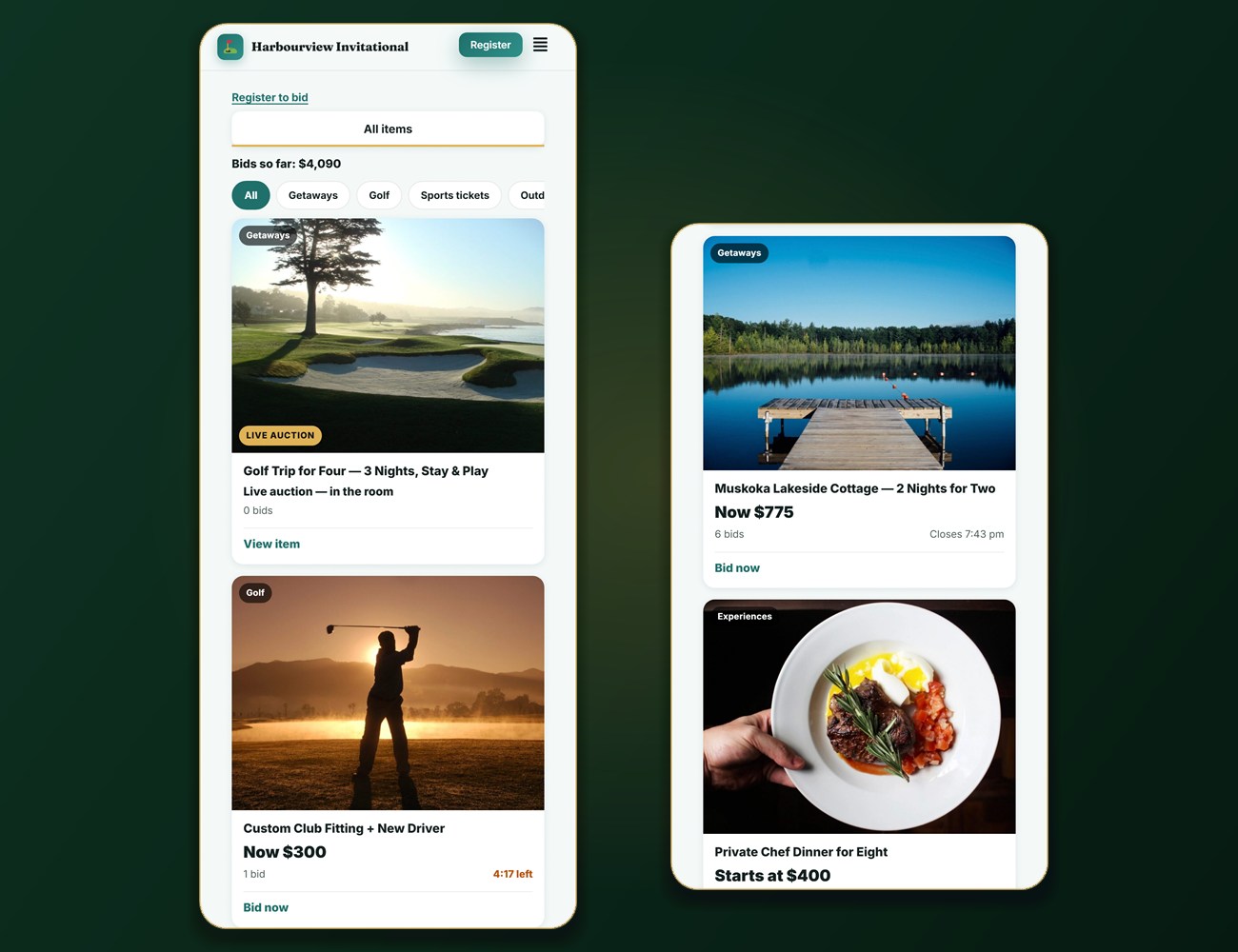
Our golf tournament silent auction software lets guests bid from their own phones. Late bids add time. Winners pay by card from their phone or at your desk. It all runs from the same event site as your registration, sponsors and Big Board: no separate login, no extra platform fee, and the money goes straight to your own Square account.
Built for outdoor fundraising tournaments. Try the demo with test data: nothing on it takes a real payment.
HOW IT WORKS
How our golf tournament silent auction software runs your night.
Six steps from the item list to the final tally, all on your own event site.
STEP 1
Add your items
Type them in or import a spreadsheet. Add photos, a value, a starting bid, an optional hidden reserve and an optional buy-now price, and credit the donor or pick a sponsor from your list.
STEP 2
Set the clock
One closing time for everything, or a time per item, or groups of items closing a few minutes apart. Set a hard stop if you want one.
STEP 3
Open the doors
Golfers get the link in the emails they already receive, and anyone can scan the QR code on a table card or the Big Board. A name, an email and a six-digit code, and they’re bidding.
STEP 4
Bids come in
Guests tap to bid or set a maximum, and the system bids only as much as it needs to. Outbid? They hear about it by email and on the auction page.
STEP 5
The last minutes
A bid near the close adds a couple of minutes, up to your hard stop if you set one. Everyone gets one more chance and your evening still ends on time.
STEP 6
Get paid, count up
Winners pay by card from their phone, with cash at your desk, or by a cheque you record. The results screen and spreadsheet exports are ready for your treasurer.
WHAT YOU GET
Everything a good auction needs, nothing it doesn’t.
Good golf tournament silent auction software is simple for a guest in a golf shirt, solid for the volunteer at the desk, and tidy for the treasurer afterwards.
BIDDING
Bid from their own phone
Guests open the auction in their phone’s browser. Nothing to download, and no card to enter before bidding.
MAXIMUM BIDS
Set a maximum, enjoy the night
The system bids only as much as it needs to keep your guest in front. The maximum stays hidden from other bidders and never appears on the Big Board.
FAIR ENDINGS
No last-second snipes
A late bid adds time (one to fifteen minutes, your choice), up to a hard stop if you set one.
ALERTS
They hear about it
Outbid, closing-soon and you-won messages by email and on the auction page, so nobody has to keep refreshing.
RESERVE & BUY-NOW
The item someone must have
Set a reserve nobody can see, and a buy-now price for the showpiece. Bidding on an item pauses while a buy-now is being paid.
LIVE AUCTION
Live items and floor bids
Run the big package live: a volunteer enters the hammer price and the bidder number. Guests without a phone can bid through a volunteer at the desk.
TABLE CARDS & BIG BOARD
Scan to bid, watch it close
Print a table card with a QR code for each item. The Big Board shows closing countdowns and top prices, with a code to scan to start bidding.
RESULTS & LOG
Clean numbers, a clear record
A results screen, spreadsheet exports, and a log of every bid, extension and payment that nobody can edit. Void a bid, remove an item or block a bidder, and the people affected are told.
STRAIGHT ANSWERS
What it handles for you, and what still needs people.
We’d rather you know before you plan the night. Software still needs people, and a good auction desk makes the evening.
HANDLED FOR YOU
The auction does the counting
- Bidding, outbids, closing times, winners and the results
- Alerts by email and on the auction page
- A confirmation email for each online payment
- A log of every bid, extension and payment
STILL NEEDS PEOPLE
Your volunteers make it work
- A volunteer at the desk for cash, cheques and guests without a phone
- Someone to announce when bidding opens and closes
- Your items, photos and donors
- Tax receipts stay with your charity: TourneyCommand doesn’t issue them
- No text-message alerts: messages go by email and on the auction page
PRICING
Included in the event price. Not a tier.
One flat fee per outdoor tournament, with every feature included, the golf tournament silent auction software among them.
INCLUDED
Part of your event price, not an upgrade
On some platforms the silent auction sits on the top plan or behind a paywall (we checked in October 2026; see what registration software really costs). Here it is included in your event price, with no extra platform fee and no cut of what your guests bid.
Card fees are passed on to payers only if you have turned the card fee on for your event, exactly as with your other add-ons. Otherwise you pay only what Square charges you, into your own Square account, from the first payment.
WHY IT'S BUILT IN
One event site, not a second login.
Most golf tournament silent auction software is a second login: another account, another bill, another list of bidders to reconcile with your registrations. We built the auction into the same event site that already knows your golfers, your sponsors and your Square account.
Golfers get the link in the emails they already receive. Sponsors can be credited straight from your sponsor list. The money lands in your own Square account, never ours. And the whole thing sits next to your registration, check-in, scoring and Big Board, so one volunteer knows one system.
One event site, one list of people, one place the money lands. The auction table shouldn’t be a second spreadsheet.
Questions
Silent auction questions, answered plainly.
The short answers about our golf tournament silent auction software. The full list of questions about TourneyCommand is on the FAQ page.
Do guests need to download an app?
No. The auction opens in the phone’s browser, from the link in their email, a QR code on a table card or the Big Board, or the Auction button on their Game Day pass if you use it.
Can guests who aren’t golfers bid?
Yes. They sign in with a name, an email and a six-digit code, or a volunteer registers them at the desk. Nobody has to enter a card to bid.
What if someone doesn’t have a phone?
A volunteer can place a floor bid for them from the desk, and they can pay at the desk.
Can I run a live auction as well?
Yes. Mark an item as live and a volunteer enters the hammer price and the bidder number at the desk. It is recorded and logged like every other sale.
How do winners pay?
By card from their phone, with cash at your desk, or by a cheque you record. Online card payments go straight into your own Square account.
Is there a fee for the auction?
No extra platform fee: it is included in your event price. If you have turned on passing the card fee to payers, that applies to auction payments too, as it does for your other add-ons.
Does TourneyCommand issue tax receipts for auction items?
No. Receipting is your charity’s job under the CRA’s rules. Read our guide to golf tournament tax receipts in Canada before you promise anyone a receipt.
Can I try it first?
Yes. Open the demo auction, place a bid with test data, and look at the rest of an event site running on the same software.
Run your auction on your own event site.
One flat fee, every feature included, and every dollar you raise stays with your cause. Want to look first? Open the demo auction.
